





Coaching Requirements
Coach Rostering Requirements 2026–2027 Season
To be officially rostered and eligible to coach for the Arapahoe Warriors or Lady Warriors during the 2026–2027 season, all requirements listed below must be completed. Coaches can now view their coaching status on USA Hockey's new LMS system at https://lms.usahockeylearningcenter.com/learn.
✅ Required Steps for All Coaches
(Click the blue links below to access each site)
- Required annually. The 4th digit will indicate the year of expiration. For the current season, this digit should be a "7".
- You will receive a confirmation email with your USA Hockey registration number.
- Submit your number here: Submit USA Hockey Number – it will be shared with the appropriate Arapahoe Warriors staff.
- You cannot be rostered until this is complete.
- 90-minute training video with knowledge checks.
- SafeSport certification is valid for 12 months.
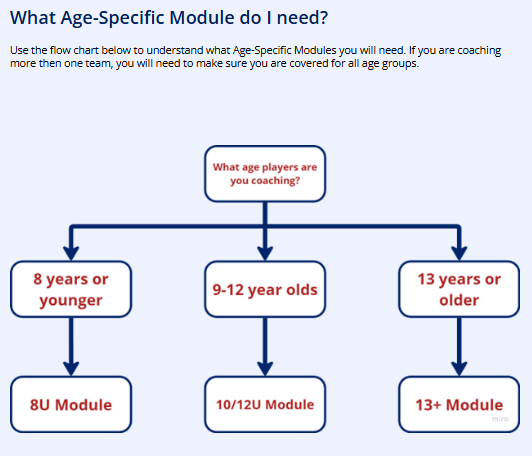
- Coaches must take:
- A Core Course every 4 years
- Followed by three annual refresher courses
- Certification is mandatory every season.
- You cannot be rostered until this is complete.
- Cost: $30 (valid for two years).
- Completed through NCSI.
- Processing takes approximately 10–14 business days.
- Use the pre-filled self-registration ID (35615801) — do not change this number.
- You cannot be rostered until this is complete.
- Free and required annually.
- Make sure to Submit Concussion Certification Here once completed
6. Coaching Education Program (CEP)
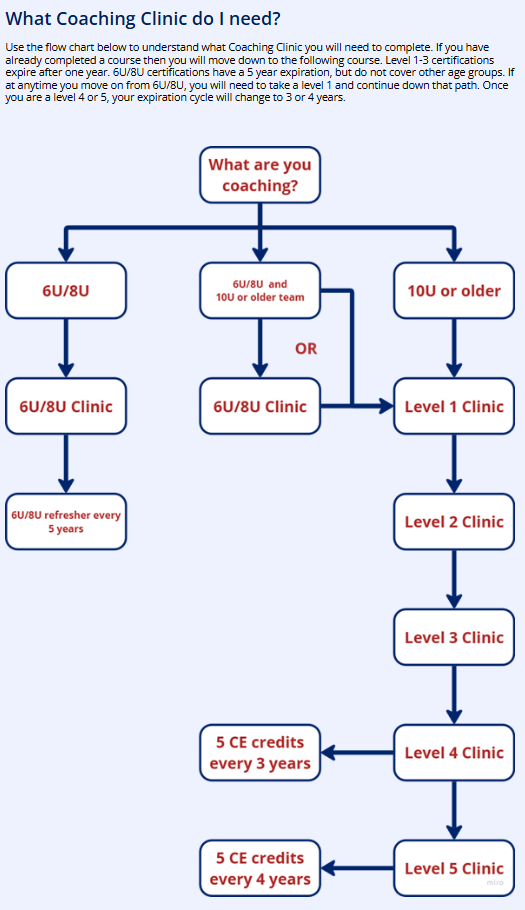
- All coaches begin at Level 1 (L1).
- CEP Deadline: December 31, 2024 for coaches at 10U and older.
- 8U coaches may coach with an expired L1, but must have completed L1.
- CEP Levels:
- Level 1–3: Valid for 1 year each.
- Level 4: Valid for 3 years; requires 5 continuing ed credits to renew.
- Level 5: Valid for 4 years; also requires 5 continuing ed credits.
- 👉 Find a CEP Clinic
Specific Coaching Credentials for 8U Coaches
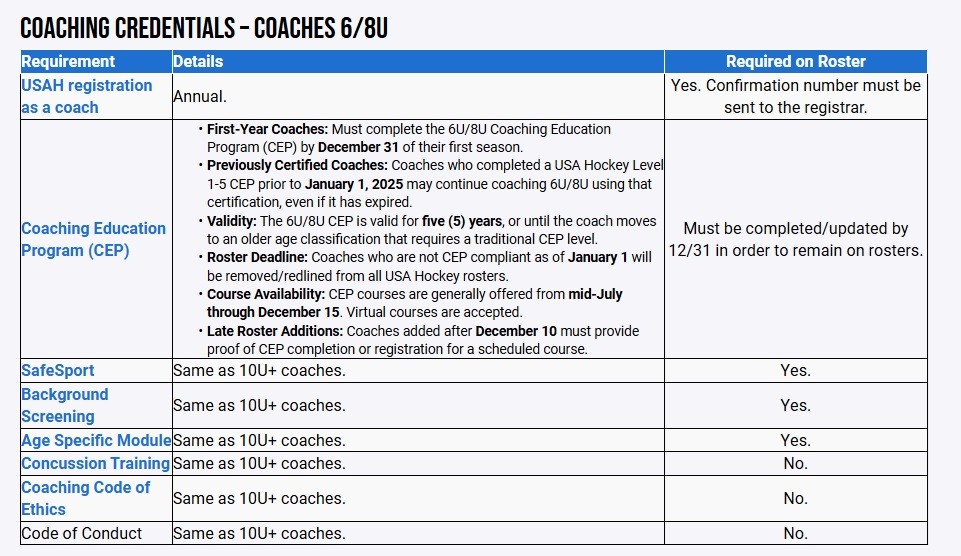
8U Coaches - Please Complete These Additional Steps
1. If you have an Agility account and have been confirmed as a coach in the past:
Login at https://agilityhockeysystems.com
*If you forgot your password, please do not create a new account. Use the “Forgot Password” function.
Go to “My Coaching” > “My Coaching Levels” and check the appropriate box(es).
Then you can go to “My Coaching” > “My Coaching Sessions” and sign up for individual sessions.
2. If you have an Agility account but have not coached before:
Login at https://agilityhockeysystems.com
*If you forgot your password, please do not create a new account. Use the “Forgot Password” function.
Click on your email address (upper left) and then “My Profile”. Check the box next to “I would like to be a coach” and click “Update Profile”.
Once you receive an email that you have been confirmed by the administrator:
Go to “My Coaching” > “My Coaching Levels” and check the appropriate box(es).
Then you can go to “My Coaching” > “My Coaching Sessions” and sign up for individual sessions.
3. If you are new to Agility:
Go to https://agilityhockeysystems.com
Go to “Login/Register”
Click on “Create Account” (upper right)
Make sure to pick the correct association and create your account using Parent Information (Not player’s). Also, remember your login email and password for all future use.
Check the box next to “I would like to be a coach”
Once you receive an email that you have been confirmed as a coach by the administrator:
Go to “My Coaching” > “My Coaching Levels” and check the appropriate box(es).
Then you can go to “My Coaching” > “My Coaching Sessions” and sign up for individual sessions.